Signal Routing and Architecture in Professional Audio Mixing Consoles
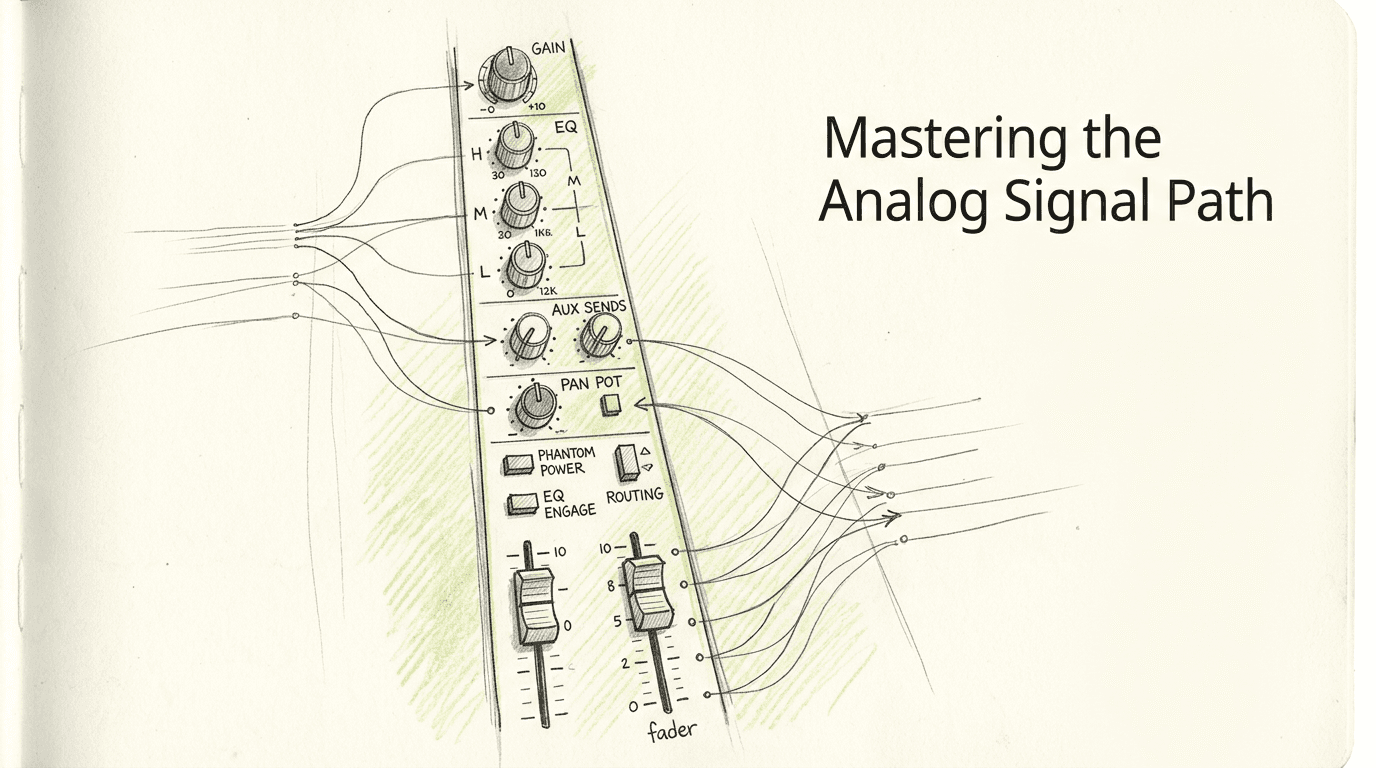
A persistent misconception regarding analog studio equipment is that large-format desks exist primarily to impart harmonic distortion or "color" to a sterile digital mix. In reality, the defining engineering characteristic of professional audio mixing consoles is absolute control over complex signal routing. A high-end console is fundamentally a voltage management matrix. It allows an engineer to take dozens of discrete electrical streams, parallel route them to outboard processors, balance their voltage levels, and sum them together into a coherent stereo image without inducing phase cancellation, crosstalk, or noise floor accumulation. Understanding this architecture is what separates a capable digital operator from an engineer who can successfully integrate heavy analog hardware.
Quick Summary
Professional audio mixing consoles function as the central nervous system of a hybrid studio, dictating how analog voltages are processed, routed, and summed. Their value lies in workflow efficiency, tactile gain staging, and zero-latency monitoring rather than merely acting as static distortion boxes.
- Inline architecture houses separate record and monitor paths in a single physical channel strip.
- High-voltage internal rails provide massive headroom, allowing aggressive transient handling before clipping.
- Virtual earth summing aggregates multiple audio streams without the mathematical rounding errors of digital buses.
- Patchbay integration dictates the true flexibility of the console, but introduces specific failure points in grounding and phase.
Table of Contents
- Why audio mixing consoles dictate the studio's conversion strategy
- Why inline architecture defines large-format workflow
- Where analog gain staging prevents digital clipping
- How split layouts compare to inline topologies
- What breaks first when integrating outboard routing
- Who should skip large-format architecture entirely
- FAQ
- Recommended Reads
Why audio mixing consoles dictate the studio's conversion strategy
Implementing audio mixing consoles into a modern studio completely redefines the facility's digital-to-analog (D/A) and analog-to-digital (A/D) requirements. Unlike working entirely inside a computer - where track counts are limited only by CPU processing power - a physical console operates on a fixed 1:1 hardware ratio. Every digital track you wish to process externally requires a dedicated D/A converter channel to translate the binary audio into a continuous electrical voltage.
This conversion strategy forces an immediate trade-off between channel count and conversion quality. Running a 48-channel analog mixdown requires 48 discrete outputs from the digital audio workstation (DAW). The mechanism at play is analog summing. When these 48 discrete voltages meet at the console's master section, they are combined using a summing amplifier - typically a virtual earth topology that keeps the impedance of each incoming channel isolated from the others. This prevents the adjustment of one fader from altering the resistance, and therefore the volume, of an adjacent channel.
However, analog summing brings an unavoidable physical consequence: noise floor accumulation. Every active channel on an analog desk introduces a baseline level of thermal noise, regardless of whether audio is currently passing through it. When 48 channels are summed, their self-noise is summed alongside the music.
To act on this limitation, you must calculate the actual channel count required for your workflow rather than buying the largest frame size available. Engineers managing complex workflows for hybrid mixing services often stem their digital tracks down to 16 or 24 analog outputs. This hybrid approach leverages the console's headroom and tactile control while significantly reducing both converter costs and aggregate noise floor. You can test your own noise penalty by turning all faders to unity gain, terminating the inputs with no audio playing, and measuring the resulting noise floor at the master bus output.
Why inline architecture defines large-format workflow
Large-format recording environments almost universally rely on inline console architecture. This specific topological design solves a critical problem in multitrack recording: the need to simultaneously send a microphone signal to the recorder while monitoring the delayed playback of that same track from the recorder, all without doubling the physical width of the desk.
An inline channel strip works by housing two entirely separate audio paths inside a single vertical module. The first is the channel path, which takes the incoming microphone or line signal, amplifies it, and routes it out to the DAW or tape machine. The second is the monitor path, which receives the playback signal returning from the recording medium and routes it to the control room speakers.
The technical advantage of this design is the "flip" or "swap" mechanism. A centralized global switch, or local channel buttons, allow the engineer to instantly reassign the main large fader from controlling the input level to controlling the playback level. Furthermore, the inline design typically allows the channel's equalizer and dynamics sections to be independently assigned to either path. You can apply an aggressive high-pass filter to the channel path (recording it permanently into the DAW) while applying a subtle high-frequency shelf to the monitor path (only affecting what you hear in the room).
Practical rule: Always document which path your equalizer is patched into before committing a performance to disk; accidentally engaging the EQ on the monitor path means the processing will not be captured on the recording.
For studios investigating professional stem mastering services, inline routing offers a seamless transition between tracking and mixing. During mixdown, the flip switch is engaged globally, turning the 48 small faders and 48 large faders into 96 simultaneous line inputs for massive hybrid summing configurations. The trade-off is mechanical density. Packing two discrete signal paths into one two-inch-wide module means doubling the number of potentiometers, switches, and ribbon cable connections, which exponentially increases routine maintenance requirements.
Where analog gain staging prevents digital clipping
One of the most consequential differences between digital mixing environments and analog consoles is how they handle transient voltage peaks. In a 32-bit floating-point digital environment, internal clipping is mathematically impossible, but the moment that signal hits a D/A converter, the limit is an absolute, brick-wall ceiling at 0 dBFS.
Analog consoles operate on a completely different headroom paradigm governed by their internal power supply rails. A professional large-format desk typically runs on bipolar power supplies, generating between +/- 18 volts and +/- 24 volts internally. This massive voltage swing gives the console a theoretical maximum output of around +28 dBu before catastrophic hard clipping occurs.
When a high-transient signal - such as a snare drum or a percussive synthesizer - exceeds nominal operating levels in this analog environment, it does not hit a brick wall. Instead, the console's transformers, op-amps, and summing amplifiers begin to enter soft saturation. This mechanism rounds off the aggressive transient peaks, effectively acting as a form of ultra-fast analog compression while generating complex harmonic content.
This behavior is why engineers can drive an analog mix bus significantly harder than a digital master fader. The analog components absorb the peaks, resulting in a denser, punchier mix with a higher perceived average loudness. To utilize this effectively and align it with professional audio mastering standards, you must calibrate your entire studio system.
To act on this today, check the calibration alignment between your digital converters and your analog desk. The industry standard maps -18 dBFS (digital) to +4 dBu (analog). If your converters are incorrectly calibrated to send out too much voltage, you will unintentionally overdrive the console's line inputs, robbing yourself of the clean headroom needed to balance a dense mix.
How split layouts compare to inline topologies
Before inline architecture dominated the market, studios utilized the split console design. Comparing these two topologies reveals distinct operational trade-offs regarding footprint, signal flow clarity, and maintenance.
| Design Dimension | Split Console Architecture | Inline Console Architecture |
|---|---|---|
| Physical Footprint | Extremely wide; requires dedicated return section | Compact; folds returns into input channels |
| Signal Flow Clarity | High; distinct physical separation of tasks | Complex; requires understanding of switching matrices |
| Input Switching | Fixed sections for mic inputs and tape returns | Dynamic "Flip" switching per channel or globally |
| Maintenance Access | Straightforward; distinct modules per function | Dense; crowded PCB layouts prone to heat issues |
| Cost-to-Channel Ratio | Higher cost per active mix channel | Lower cost; effectively doubles inputs at mixdown |
A split console physically separates the input tracking section on one side of the desk from the monitor return section on the other. If you have 24 microphone inputs on the left, you will have 24 dedicated playback faders on the right. The primary mechanism here is absolute clarity. There is no confusion about which fader controls what, as the paths never cross within the same module.
The failure mode of a split console is scale. As track counts grew to 48 and 72 channels, a split desk became physically too wide for one engineer to reach across, placing the listening position outside the acoustic sweet spot of the control room. If you are exploring a studio tour of a legacy analog facility, you will often spot older split designs relegated to side rooms, while inline desks occupy the main mixing stages.
The actionable takeaway is assessing your specific workflow. If you primarily track small acoustic ensembles live in the room and rarely mix high-track-count projects, the visual simplicity of a split desk (or a modern split-style sidecar) is superior. If your track counts routinely exceed 32 channels, inline architecture is the only practical solution for maintaining a centralized mixing position.
What breaks first when integrating outboard routing
The true power of a console is its integration with outboard equipment via an analog patchbay. However, this dense matrix of TT (bantam) cables is where large-format systems experience their most debilitating failure modes. When signal degradation occurs, it rarely points to a catastrophic failure of the desk itself. Instead, it is usually a routing implementation error. Here are the distinct problems that masquerade as console failures, and how to isolate them.

Ground Loop Hum in the Patchbay Matrix The most common failure when interfacing a console with external racks is a 60Hz (or 50Hz) mains hum. This occurs when an audio cable's shield connects two pieces of equipment that are plugged into different electrical grounds, creating an unintended antenna.
- Symptom: A low, constant hum that increases when a specific outboard compressor or EQ is patched into the channel insert.
- The Fix: Implement a telescoping shield protocol. Tie the cable shield to ground at the output stage (the patchbay send) and clip the shield at the input stage (the outboard gear's receive connector). This breaks the ground loop while maintaining RF protection.
Impedance Mismatching on Insert Returns Vintage outboard equipment, often utilized in traditional analog mastering environments, was designed with 600-ohm input and output impedances. Modern console insert points are typically designed for voltage bridging (low output impedance driving high input impedance).
- Symptom: Patching in a specific vintage equalizer causes a sudden drop in overall level and a noticeable roll-off in the high frequencies, making the track sound dull.
- The Fix: Use a dedicated line matching amplifier or transformer isolator in the rack before returning the signal to the console's insert point.
Phase Degradation from Parallel Routing Parallel processing involves duplicating a signal, processing the copy aggressively, and blending it back with the dry original. When this loop passes through a DAW and a console simultaneously, latency destroys the phase relationship.
- Symptom: Blending a heavily compressed parallel drum bus back into the main mix causes the snare drum to sound hollow, thin, and comb-filtered.
- The Fix: Hardware insert delay compensation must be perfectly calculated down to the sample level inside the DAW before the signals hit the analog console's summing matrix.
Practical rule: Never troubleshoot a noisy channel strip without first pulling every patch cable out of the bay; normalization contacts inside the patchbay are the cause of signal drops in 90 percent of cases.
When confronted with signal degradation, ask yourself these diagnostic questions:
- Does the hum vanish when you physically unbolt the outboard chassis from the metal rack?
- Is the high-frequency loss isolated to one channel, or does it happen across the entire master bus?
- Does the snare drum lose its low-end punch specifically when the parallel return fader is brought up?
Who should skip large-format architecture entirely
Despite the undeniable headroom and workflow advantages, a large-format analog console is a severe liability for specific modern production styles. The primary limitation of analog architecture is the total absence of instantaneous session recall.
In an analog desk, every routing assignment, equalization curve, auxiliary send, and panning position is governed by a physical switch or potentiometer. While motorized VCA faders can recall volume automation, restoring a mix requires manually turning hundreds of knobs back to their exact positions based on documented recall sheets. Even with modern digitally controlled analog recall systems - where an interface guides the engineer to match LEDs - resetting a 48-channel desk for a client revision takes significant time.
This workflow is entirely incompatible with electronic music producers, beatmakers, and high-volume mix engineers who juggle multiple active projects in a single day and require instant recall to address minor client tweaks. The breadth of analog control costs you speed and agility.
If your business model demands jumping between five different mix sessions before lunch, you should skip large-format architecture entirely. Instead, you are better served by referencing comprehensive mastering guides and tutorials on hybrid setups. A dedicated summing mixer paired with a comprehensive DAW controller provides the analog headroom and voltage aggregation required, while leaving all equalization, dynamics, and routing automation securely inside the digital domain where it can be recalled in seconds.
FAQ
What is the difference between a console and a summing mixer? A summing mixer strictly handles the aggregation of multiple analog signals into a stereo output. A console includes summing, but adds microphone preamplifiers, equalization, auxiliary routing, and dedicated monitor control sections.
Do I need an analog console to achieve commercial loudness? No. Commercial loudness is primarily achieved during the final dynamics processing stages, not the mixing stage. While a console's high voltage rails allow you to push transients harder into soft clipping, loudness targets can be met entirely in the digital domain.
Why do analog consoles use VCA faders instead of passing audio directly through the fader? Voltage Controlled Amplifiers (VCAs) allow a single master fader to control the DC control voltage of multiple channel faders simultaneously. This mechanism enables complex subgroup automation without forcing the actual analog audio signal to route through additional lengthy wiring paths, preserving signal integrity.
How does impedance bridging affect console inserts? Modern consoles use impedance bridging, where a low output impedance (e.g., 50 ohms) drives a high input impedance (e.g., 10,000 ohms). This ensures maximum voltage transfer between the console and outboard gear without signal loss or frequency degradation.